learning-c-with-pebble
Chapter 3: Variables and Other Basics
As we use high level programming languages to write our programs, we learn that programming languages specialize in abstraction. Abstraction is a way of hiding irrelevant detail and focusing on the things that matter. Programming languages focus our attention on algorithms and the data we need to power those algorithms, ignoring the actual details of making those algorithms work on specific CPU architectures.
We start looking at the C programming language by working with abstractions of computer memory. Variables are abstractions of memory words; when we work with variables, we are really working with memory. But the gory details of how we are working with memory are hidden and we are left with the niceties that we get in C.
We will start out by defining variables and how we work them. We will also need to define data types, as they are central to how we work with variables. We will also look at the unique ways C lets us manipulate memory through variables, and we will look at how this all works in a Pebble smartwatch.
Defining Variables
Variables are symbols that stand for words in a computer’s memory. As such, they have a value that can be set and that is remembered until it is changed. That value can also be referenced for use in computations.
Let’s take an example.
miles = 230;
gallons = 12;
milesPerGallon = miles / gallons;
In this simple example, we are working with three variables, which stand for three memory words. The first two lines assign values to two variables; the third line uses the values we assigned to compute and assign a value to a third variable.
In the example, we used a number of operators to manipulate values of variables. Which operator we may use depends on the kind of value we are using (see the next section on data types for more), but the assignment operator is always defined for all variables. The assignment operator takes the value on the right of the “=” sign and makes it the value of the variable on the left of the “=” sign. When a variable is referenced on the right of the “=” operator, it gives up its value. So when the third line in the above example is executed, it’s the same as as executing milesPerGallon = 230 / 12.
Let’s consider another example:
positionX = 72;
positionY = 25;
acceleration = 1;
x_velocity = 3;
y_velocity = x_velocity;
First, note that there are rules for variable names. Variables names must be comprised of a combination letters, numbers, and an underscore (“_”). They must start with either a letter or an underscore and they may be of any length. By convention, as in the example above, variable names that could logically be made up of multiple words (“x velocity”) are given a name with an underscore replacing any spaces (x_velocity).
Second, note that C is case-sensitive when it comes to variable names. This means that capital letters are considered different than lowercase letters. positionX is not the same variable as positionx.
It is indeed possible to use a variable without first assigning it a value. However, remember that variables are simply abstractions for memory words. The result of using a variable without initializing is an unpredictable value; you get whatever was left over in memory from the last time the memory word was used. Most often, programmers just assume that variables are automatically initialized to zero when a program starts; it is actually best to assume that any left over data is just useless.
Different Compiler Behavior
Sometimes, C compilers behave differently with small details like using variables without initialization. There have been several attempts to standardize C, but compilers – particularly the variety of open source compilers – don’t all adhere to the same standard. In addition, standards don’t always address details like variable initialization. This leaves compiler writers free to choose. So, in regard to variable initialization, most compilers do not automatically initialize variables, but some do. Make sure you check your compiler before you rely on this behavior.
Data Types
Variables have two important properties: what values can be assigned to them and what operations can be done to them. Together, these two properties are called a data type. Every variable used in a C program must have a data type.
Consider the example code below:
int radius;
float pi;
double circumference;
Here, we have declared three variables: radius, which can take on integer values, pi, which can take on floating point values in memory words, and circumference, which take on floating point values that are double the size of other floating point values. Note that an integer is a whole number without any decimal points and a floating point number has a decimal point and is capable of representing fractional numbers. Note, too, that a variable must be declared before it is used in a C program; the C compiler must know what values and operations are to be used with a variable before it works with that variable.
Once we have declared the variables as in the example above, we can work with them like in this example:
radius = 23;
pi = 3.14159;
circumference = 2 * pi * radius;
Since pi can take on floating point (i.e., fractional) values, we can use a decimal point in its assignment.
Note that, given each variable’s declaration, values outside the declared value set are considered an error. For example, trying to assign a floating point value to an integer variable would be flagged as an error:
radius = 23.1;
Since setting a variable to an initial value is such a common exercise, declarations allow assignments in the declaration statement. So, we can combine the above declaration and assignment examples like this:
int radius = 23;
float pi = 3.14159;
double circumference = 2 * pi * radius;
Literals
As we have seen, literals have a data type. The absence of a decimal point in a number usually indicates that the number is an integer. Likewise, the presence of a decimal point usually indicates that the number is a float data type.
However, there are ways of designating numbers that get around these assumptions. This typically means that you put a letter at the end of the number. For example, 23 is an integer, but 23L is a long integer and 23F is a floating point number.
The table below shows letter designations for data types and gives some examples.
| Literal | Declaring Keyword | Description | Example | Illegal Example | Integer | int |
A whole number in decimal, octal, or hexadecimal form. Integers can have prefixes that explain the base in which they are specified and suffixes that explain the type of the integer. | 23 23L 0x23 0o23L | 23.0 0o238 | </TR>
| Floating-Point | float |
A number with an integer part, a decimal point, a fractional part, and an exponent part. Floating point numbers can be expressed in decimal or exponential form. Suffixes of F or E are allowed to indicate floating-point or start exponent expression. | 15.6 156E-1 |
25. 100.0E |
| Double Floating-Point | double |
A floating point number with double the memory space for storage. | 15.6 156E-1 |
25. 100.0E |
| Character | char |
A representation of letters and other character data. Pebble smartwatches use the Unicode representation for character data, allowing over 65,000 different characters. | 'A' '5' '#' |
"A" "string" |
| Boolean | int |
A representation of true and false values. Boolean operators are logical operators. | 1 0 |
"true" "false" T FALSE |
Other Basic Data Types
The table in the previous sections adds two data types to ones we have discussed. Character data types are declared with the char keyword and hold single characters/symbols as their value. On a Pebble smartwatch, these values come from the Unicode character set. Unicode contains a Western style alphabet in the first 128 characters and a large collection of the other alphabets in the rest of the set. Note that character data types include numbers as characters, so that '5' is not the same as 5. Character literals are represented using single quotes.
Characters are not Strings
It is useful to emphasize that
chardata types only hold a single character, not a string of characters. Strings are not built into C as they are in some other languages. Strings are represented by arrays of characters – sequences – and will be discussed at length in Chapter 9.
Sometimes character data cannot be represented very easily. For example, how does C represent a TAB character? A TAB is not visible, yet is useful in programs. For these issues, C uses escape sequences. An escape sequence begins with an escape character and include either a letter or a number sequence to reference the characters Unicode value. The number sequence is useful to reference characters that do not have a symbol with which to refer to them.
Let’s look at an example.
char letter = 'A';
char letter2 = 'a';
char letter3 = '\092';
char letter4 = letter + 32;
int difference = letter2 - letter3;
The first three declarations are not unusual; we just defined character literals as having representations like these. The declaration of letter4 demonstrates type conversion. Technically, the + operator is not defined for characters, so letter has to be converted to an integer before addition. Then the type of the resulting expression (int) is converted back to char before assignment to letter4. When converting a character to an integer, the Unicode value of the character is used. This means that the last declaration declares difference to be an integer that has the value of 0.
The last basic data type in C isn’t really a data type. C does not include the definition of a boolean type as most programming languages do. A boolean data type would take on the values true or false and use logical operators, such as and and or. C supports boolean operations, but does not have an explicit boolean type. This means that comparisons can generate boolean values, but C does not have boolean literals.
Notice the literal table in the last section. It lists 1 and 0 as boolean literals. C considers 0 to be false and non-zero values to be true. This means that the integer data type also serves as the boolean data type for C.
Consider this example:
int true=1, false=0;
int x, y;

x = true;
y = (x == true);
We can simulate boolean operations and values by using integer data types. In this example, x is treated as a boolean, and is given the value true, which makes sense because true is also an integer. However, y gets its value from a comparison, something that gives a true or false value. And that comparison value is assigned to an integer.
If we were to print the values of x and y, both would have the value 1, or true.
Let’s look at another example, using the definitions of true and false from the previous example.
int retired = true;
int still_working = true;
int gets_a_pension = (retired && ! still_working) || (age > 65 && hours < 20);
This demonstrates a boolean expression, which is computed from boolean values. Boolean values come from variables or operations that give up boolean results. So retired takes on the value false (really 0 as the literal value), but gets_a_pension computes its value from boolean operations and comparison operations. Consider the table of boolean operators below
| Operator Name | Syntax | Meaning | Example |
| AND | a && b | Result is true when both operands are true | true && false (miles < traveled) && still_running |
| OR | a || b | Result is true when at least one of the operands is true | true || false (miles < traveled) || still_running |
| NOT | ! a | Result is true when the operand is false; result is false when the operand is true | ! true ! (miles < traveled) |
Let’s assume that age equals 70 and hours equals 25. We can then compute the expression as the figure below:

The final result of the expression in Figure 3.1 is false (or 0).
Type Conversion
There are many times when the values in one data type could be used with another data type. For example, the value 23 can be used for integer and floating point numbers. When the value of one type can be used for another, we say that the value is converted from one type to another. That value is converted before it is assigned. So, for example, consider the code below:
int radius = 23;
float pi = 3.14159;
float extra = 23;
double circumference = 2 * pi * radius;
In the first line, an integer is assigned to an integer variable. In the second line, a floating point number is assigned to a floating point variable. In the third line, however, an integer value is assigned to a floating point variable. Technically, this does not work: the two sides are different types. However, the integer type is type compatible with the floating point type and C automatically converts 23 to 23.0 and the assignment is made without problems.
The fourth line of the example is interesting. We have to determine the data type of the right hand computation in order to see if it can be assigned to the double floating point on the left. In C, the data type of expressions is determined by the data type that has the most values represented. So, in the example, the right hand side of the assignment takes on a floating point data type after converting 2 and the value of radius(23) to floating point. Then the expression is computed, giving a floating point result. Finally, the floating point result is converted to double and the assignment is made.
The point here is that conversions are necessary to follow the typing rules of C and, if it can happen, this conversion happens automatically. The data typing rules of C enforce a kind of data typing called static typing. Static typing dictates that the types of variables are derived once (at declaration) and do not change throughout the execution of a program.
Dynamic Data Typing
There are other data type rules. The opposite of static typing is dynamic typing. In dynamic typing, variables change their data type depending on the values assigned to them. Variables need no declaration because they have no initial data type. If the example above were dynamically typed, the last line does not convert the result to double before assignment, the variable takes on a float data type to match the right hand expression’s data type.
Javascript, another language that can be used to program Pebble smartwatches, is an example of a dynamically typed language. In Javascript, variables are declared, but they are simply called “var” to indicate they are variables. The data type of a variable is assigned when a value is assigned.
In C, variables are also strongly typed. This means that once variables are bound to a data type, they stay bound to that type. Which means that they cannot not change types, but require other types to be converted to their data type before they are assigned.
Weak Data Typing
The opposite of strong typing is weak typing, where variables can change their data types during the execution of a program. PHP is an example of a weakly typed language. In PHP, you could execute
$peb = "a"; $peb = $peb + 2, which is an error in some languages. The variablepebin this case changes types from a character to an integer as the program executes.
Let’s consider one more example.
angle = (angle + 1) % 360;
int dangle = TRIG_MAX_ANGLE * angle / 360;
Here, we see the use of the % operator – the modulo or remainder operator – and we have to decide about division. The modulo operator is an integer operator that produces the remainder of a division of the two operands. In this case, the variable angle will increment, then get divided by 360, with the remainder assigned back to angle. If this code were repeated many times, the value of angle would cycle between 0 and 360.
The division in the second line could produce one of several values, depending on the data type of the variables used. If we assume that this code does not produce an error, the declaration data type of int says that dangle needs an integer value and the right side had better produce it. That means that no part of the expression on the right should be of a floating point or double data type. The integer version of the division operator will discard any fractional result. This means that if the left side of the division is less than 360, the result will be 0.
Declaration Modifiers
Since variables are just abstractions of memory words, declarations in C provide information for the compiler about the size of memory word to use for the declared variable. C defines some declaration modifiers that provide a little more detail about the memory word that will be used to represent a variable. These modifiers are included in a variable’s declaration.
As an example, consider the declarations below:
short int si;
unsigned char uc;
long double ld;
The short modifier tells C that, instead of a regular integer, the declaration only needs half of the space normally required. unsigned declares that the character may use one more bit to represent itself in memory (that bit is normally reserved as a sign bit; for characters, it is just reserved, but not used). The long modifier declares that the double-wide floating point number should be stored in space that is twice as long as that which is used for the double type.
A list of modifers is below.
| Modifier | Meaning | Examples |
short</b> |
Halves the capacity of the data type, mostly in terms of possible values | short intshort short |
long</b> |
Double the capacity of the data type, mostly in terms of possible values | long intlong long |
unsigned</b> |
Use the sign bit of a number to store value, essentially doubling the values that can be used | unsigned intunsigned char |
const</b> |
The declared variable is a constant. | const int top = 100const unsigned char A = 0x41; |
static</b> |
The declared variable is allocated before code is run. | static int x_velocity;static float mortgage; |
A note should be made about the const modifier. Any variable declared with the const modifier must (a) include an initialization and (b) not be changed throughout the program.
Let’s consider one more example.
short int position_x;
static int x_velocity;
const int ball_radius = 10;
The first representation here declares position_x as a “half integer”. The actual size of the memory word depends on the CPU; for Pebble watches, integers are 32 bits wide. So, position_x is a 16 bit integer, which means it can have values between -32,768 and 32,767. The variable ball_radius is a constant, initialized to 10, and cannot be changed.
Note the last entry in the modifier table is static. Static variables are placed in memory words, allocated before a program is run and deallocated only at the end of the program. Normally, variables are allocated in memory when the block they are declared in is encountered by the program’s execution (for more info on block, see the coming section on “Accessiblity Rules”). The fact that static variables are allocated once means that no matter how many times a block of code is encountered in a programs execution, the static variables in that block are allocated once. This is compared to the non-static variables, which are allocated again and again as a code block is executed.
Casting
There are times when C cannot determine the data type conversion that is needed or we want to force a conversion to take place. Consider the example below:
int total=100, number=50;
float percentage=0.0;
percentage = number / total * 100;
In this example, the division produces a value of the integer type: two integers are divided and C would consider the result an integer. Multiplication of two integers – the division times 100 – would also give an integer. The value is then converted to float and assignment operator assigns the value. The value that gets assigned is 0.
You might desire the result assigned to percentage to be 0.5. However, remember that all values on the right are integer, so the result is integer, and the integer division gives 0. If we wanted to force the floating point division, we would have to make one of the operands into a floating point. We could cast one of the operand this way:
percentage = (float)number / total * 100;
The type in parentheses converts the immediately adjacent value, which is, in this case, number. The result is a floating point value, because a floating point value (number) was included in the computation. The result of this expression is indeed 50.0.
Expressions and Precedence
When combinations of constants and variables are connected with operators, the result is called an expression. Expressions represent a computation, using the values represented to produce a single result value. That result has a data type that can be used just like single representations of literals or variables. In fact, we consider a single literal or variable as the most simple expression.
We have already seen simple expressions. In the example in the previous section, number / total * 100 represents an expression; two variables are combined with a division operation and multiplied by a third variable. The computation will result in a 0 value with an integer data type.
When we consider an expression, the order of operations is important. It is tempting to simply compute an expression in a left-to-right direction. Consider the expression below:
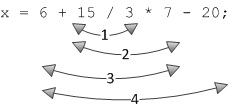
x = 6 + 15 / 3 * 7 - 20;
A left-to-right evaluation of the expression would yield a value of 22. However, C has a different order of evaluation. The rules that specify the order of evaluation are called precedence rules. A short set of precedence rules are given in the table below (a complete table is given in Appendix A).
| Precedence(s) | Operator |
| 1 | () |
| 2 | unary + - |
| 3 | * / % |
| 4 | + - |
| 5 | comparison operators |
| 6 | assignment and shortcuts |
This means the result of the expression above is actually 28, evaluated in the order shown below:
Let’s consider a more complicated example.
color_distance = sqrt( (red2 - red1) * (red2 - red1) + (green2 - green1) * (green2 - green1) + (blue2 - blue1) * (blue2 - blue1) );
The “color distance” between two pixels can be calculated as the square root of the summation of the squares of the differences between pixel color components. Note the parentheses. Those are done first, before the multiplication and division operators. So in this expression, the subtractions are done first, then the squaring/multiplications, then the additions.
Why Do We Have Precedence Rules?
After working through all the precedence rules for expression evaluation, one might ask why? Wouldn’t it just be simpler to evaluate left to right? The short answer is YES! For humans, it is probably easier to evaluate expressions left to right.
However, it turns out that for compiler to parse through complicated C syntax, grouping operators into groups is actually makes it simpler and easier to parse. By defining programming languages using grammars, compilers process groups of operators as grammar definitions, and defining C using these definitions is a clean way to specify the language.
However, this is not a very satisfying reason and grouping like this seems arbitrary. Various sources actually claim that some rules – say, multiplication before addition – find their origin in how algebraic operations are expressed: ax + b seems to imply that ax should be computed first. This type of expression goes back to the 1400’s; see this Web site for a review of early grouping symbols.
The truth is that we really don’t have a reliable explanation as to where this came from. However, it’s the rule now for C (as well as many other languages), so we deal with it.
We need to consider one more set of rules for expression evaluation. Associativity is a property of operators in the C language. For example, the expression 15 - - 2 might seem at first glance to be illegal, until one realizes that the righthand - sign is a negation operator and is associated with the 2 in the expression. Associativity plays a role in expression evaluation and is considered first before operator precedence.
The complete table of C precedence rules combined with associativity properties can be found in Appendix A.
Notation Shortcuts
There are a few notational shortcuts we can make in C. We can use them to shorten expressions and to relate algorithms more concisely.
Most shortcuts involve assignment. For example, instead of
x = x + 1;
we can use the shortcut of the increment operator like so:
x += 1;
This type of shortcut extends to several operators. The operators -=, %=, *=, and /= operate in the same way.
Two more shortcuts are used in C. As analogs to += and -= for increment and decrement operators, C includes ++ and --. Consider the following example:
x = 10;
x = x + 1;
x += 1;
x++;
After the first initialization, each following line increments x by 1.
y = 360;
y = y - 1;
y -= 1;
y --;
Again, after the first initialization, each following line decrements y by 1.
Just to make things more complicated, C specifies that these two operators can appear before or after another value in an expression. Therefore, we can have x++ as well as ++x in an expression. They are subtly different.
x++incrementsx, then evaluates to new value.++xevaluates to the value ofx, then increments the variable.
Let’s look at an example.
int x = 10;
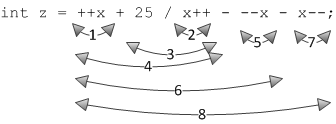
int z = ++x + 25 / x++ - --x - x--;
What is the resulting value of z? The computation goes as in Figure 3.3:
- increment
x, evaluatexto 11 - evaluate
xto 11, incrementxto 12 - perform integer division, giving 2
- perform the addition:
11 + 2giving 13 - decrement
x, evaluate to 10 - perform the subtraction:
13 - 10giving 3 - evaluate
xto 10, decrementx - evaluate the final subraction:
3 - 10, giving -7
The table below shows all the compound shortcuts in C.
| Operators</TD> | Description | </TR>
| += and -= | Addition and subtraction operators |
| *= and /= | Multiplication and division operators |
| %= | Modulo (remainder) operator |
| &=, |=, and ^= | Logical operators: and, or, and not |
| >>= and <<= | Shifting operators: right and left shifting |